
Centered Text CTA Block
The Centered Text CTA Template defines the HTML structure and content displayed within the Gutenberg editor for the Centered Text CTA Block. It is responsible for displaying a centered heading, an excerpt, and an optional call-to-action.
Content Editor Fields
Heading
- Description: The main heading text displayed at the center of the section.
- Usage: Use this field to provide a clear title for the section.
- Optional: If no heading is provided, this element will not be displayed.
Excerpt
- Description: A short description or paragraph of text displayed below the heading.
- Usage: Use this field to provide more context or information about the section.
- Optional: If no excerpt is provided, this element will not be displayed.
Call-to-Action (CTA)
- Description: A call-to-action element, which can be a link or a button.
- Usage: Use this field to encourage the user to take a specific action.
- Optional: If no CTA is provided, this element will not be displayed.
Example Usage:
Steps:
- Add the block: Insert the Centered Text CTA Block into your page or post.
- Fill the fields:
- In the block settings, fill the "Heading", "Excerpt", and "CTA" fields.
- Save the Block: Your Centered Text CTA block is now ready for display!
Result:
When properly configured, the Centered Text CTA Block will render a section with a centered heading, an excerpt, and an optional call-to-action. The text content will be centered within the section.

Preview in the editor (body):
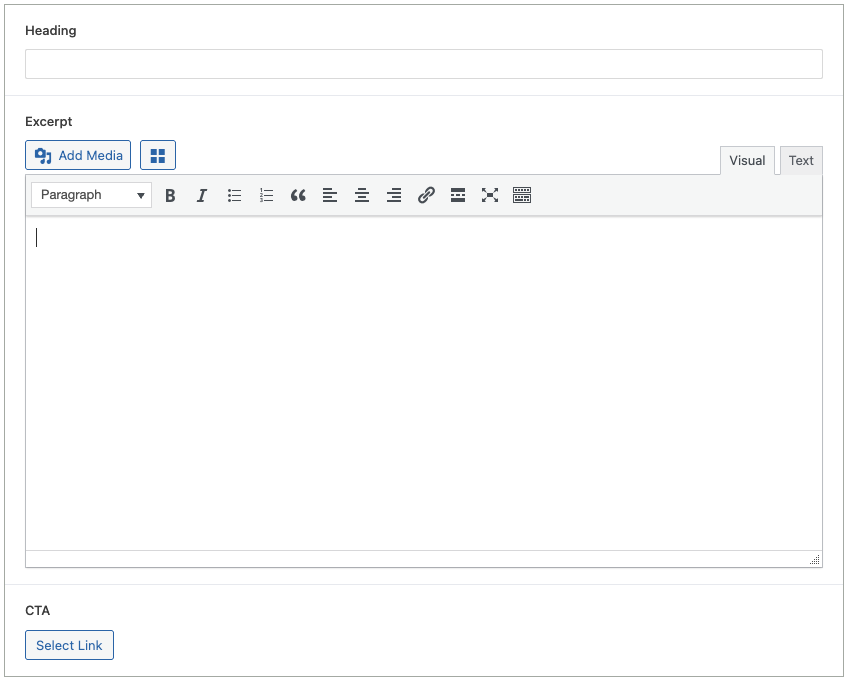
Customization:
You can customize the Centered Text CTA Block display in the following ways:
- Content Customization: Change the heading, excerpt, and CTA text directly within the block settings.
Benefits:
- Clear Structure: The template provides a simple and organized HTML structure.
- Dynamic Content: The template allows for dynamic content to be inserted.
- Easy to Use: It is simple to configure for the end user.
- Centered Content: The content is centered.
- Customizable: The block is customizable.